
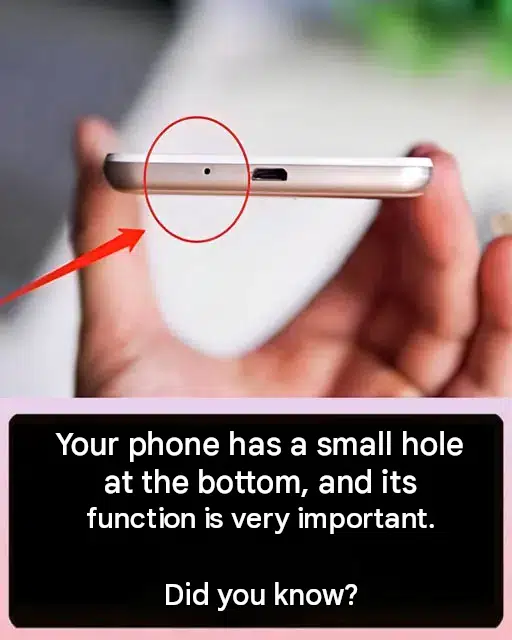
Smartphones are marvels of modern engineering. Packed into a sleek, slim glass-and-metal chassis are high-definition cameras, powerful processors, multi-band antennas, and advanced batteries. When inspecting your phone closely, you will notice various ports and slots—such as the USB charging port, speaker grills, and headphone jacks.
However, almost every smartphone also features a tiny, easily overlooked pinhole located near the bottom edge. While many users assume it is just a manufacturing flaw or a screw casing, this small hole serves a vital function that keeps your device working properly every single day.
In this comprehensive guide, we will explore the true purpose of the microphone pinhole, how sound transmission works on mobile devices, and practical tips for protecting your smartphone hardware.
The Primary Function: The Built-In Microphone
The tiny hole located at the bottom of your smartphone houses the primary microphone.
When you make a phone call, record a voice memo, talk to a digital assistant, or send a voice message, sound waves travel through this microscopic opening to reach the internal microphone diaphragm. This component converts acoustic sound waves into digital electrical signals that your phone transmits across cellular or internet networks.
Why Is It So Small?
The pinhole is intentionally kept extremely narrow for several important reasons:
- Acoustic Tuning: A small opening acts as an acoustic filter, helping direct sound waves cleanly toward the microphone while dampening unwanted ambient noise.
- Debris Protection: The tiny size prevents large dust particles, lint, and moisture from easily entering and damaging the delicate electronic components inside.
10 Facts About Smartphone Design and Hardware Features
1. Noise-Cancellation Microphones
Many smartphones feature a second (and sometimes third) tiny hole located at the top or back of the device, which acts as a noise-canceling microphone to filter out background sounds during calls.
2. Water and Dust Resistance
Modern smartphones incorporate specialized acoustic meshes and waterproof membranes behind these tiny holes to protect internal circuits from moisture without blocking sound.
3. Speaker Grills vs. Microphone Pinhole
It is crucial not to confuse the microphone pinhole with speaker grills or SIM card tray ejection holes; inserting pins into the wrong opening can puncture internal components.
4. Audio Quality and Clarity
Keeping the primary microphone clean and free of pocket lint ensures crisp, clear voice transmission during phone calls and voice recordings.
5. Voice Assistant Integration
Your phone’s ability to instantly recognize voice commands relies entirely on the acoustic sensitivity of the bottom microphone port.
6. Smartphone Durability and Care
Avoiding sharp needles or metal objects when cleaning your phone ports protects delicate internal architecture from costly damage.
7. Financial and Device Longevity
Proper hardware care preserves your smartphone’s resale value and ensures long-term operational reliability.
8. Reviewing Tech Accessories
Using a well-designed protective phone case with properly aligned cutouts prevents obstruction of the microphone and charging ports.
9. Upgrading Mobile Technology
As mobile technology advances, internal sensors and audio processors continue to improve call quality and environmental noise filtering.
10. Digital Privacy and Security
Understanding your device’s physical hardware layout helps you maintain awareness of audio recording permissions and sensor functionalities.
Comparison: Microphone Pinhole vs. SIM Tray Ejection Hole
To prevent accidental damage, it helps to distinguish between the various small holes on a smartphone chassis:
| Aperture Type | Location | Function / Purpose | Cautionary Note |
| Microphone Pinhole | Bottom edge (near charging port). | Captures voice sound waves for calls and recordings. | Never insert sharp tools or pins inside. |
| SIM Tray Ejection Hole | Side or top edge. | Houses the release mechanism for the SIM/microSD card tray. | Designed specifically for SIM ejector tools. |
       ┌────────────────────────────────────────────────────────┘
       │     Examining Smartphone Ports & Small Pinhole Layout  │
       └───────────────────────────┬────────────────────────────┘
                                   │
                                   ▼
       ┌────────────────────────────────────────────────────────┘
       │     Identifying the Primary Microphone & Audio Port    │
       └───────────────────────────┬────────────────────────────┘
                                   │
                    ┌──────────────┴──────────────┐
                    ▼                             ▼
       ┌────────────────────────┐    ┌────────────────────────┐
       │ Ensuring Clear Voice   │    │ Protecting Hardware    │
       │ Calls & Recordings     │    │ & Avoiding Damage      │
       └────────────────────────┘    └────────────────────────┘
Practical Tips for Cleaning and Maintaining Your Phone Ports
Over time, pocket lint and dust can accumulate inside your phone’s ports and microphone openings:
- Use a Soft Brush: Gently sweep away surface dust around the microphone hole using a clean, soft-bristled toothbrush.
- Avoid Sharp Objects: Never push sewing needles, paperclips, or pins into the microphone hole, as you can easily puncture the internal microphone membrane.
- Check Your Phone Case: Ensure your protective case doesn’t partially block the bottom microphone aperture, which can cause callers to complain that you sound muffled.
Financial, Insurance, and Legal Considerations
Proper smartphone maintenance safeguards your personal technology investments:
- Preventing Repair Costs: Avoiding accidental punctures to internal microphones saves you from unnecessary out-of-pocket repair bills or service fees.
- Protecting Device Warranties: Using proper cleaning methods prevents physical damage that could void manufacturer warranties.
- Maintaining Resale Value: Keeping your phone’s physical chassis clean and fully functional preserves its value when trading in or upgrading.
Fascinating Facts About Smartphone Acoustics
- MEMS Microphones: Almost all modern smartphones use Micro-Electro-Mechanical Systems (MEMS) microphones, which etch microscopic mechanical sensors directly onto silicon semiconductor chips.
- Stereo Recording: Advanced smartphones combine the bottom microphone with earpiece speakers or top mics to record high-fidelity stereo audio during video capture.
- Acoustic Engineering: Smartphone engineers spend countless hours testing airflow and sound pressure levels inside tiny device casings to optimize voice clarity.
Frequently Asked Questions (FAQ)
What does the small hole at the bottom of my phone do?
That tiny hole is the primary microphone. It allows your voice to travel inside the device so people can hear you clearly during phone calls and voice recordings.
Can I clean the microphone hole with a needle?
No! Inserting a sharp needle or pin into the microphone hole can puncture the delicate internal microphone diaphragm, permanently ruining your phone’s ability to pick up sound.
Why are there sometimes two small holes at the bottom of a phone?
If there are two symmetrical holes flanking the charging port, one is typically the primary microphone while the other houses the external loudspeaker.
Conclusion: Small Detail, Big Purpose
The tiny hole at the bottom of your smartphone may look insignificant, but it plays a massive role in your daily communication. By understanding its purpose as your phone’s primary microphone and practicing safe cleaning habits, you can keep your device running perfectly for years to come!
